Lesson 8: Version Control
| Homepage | Content | Slides | Video |
Warning
This lesson is under construction. Learn from it at your own risk. If you have any feedback, please fill out our General Feedback Survey.
Text Editor: Nano
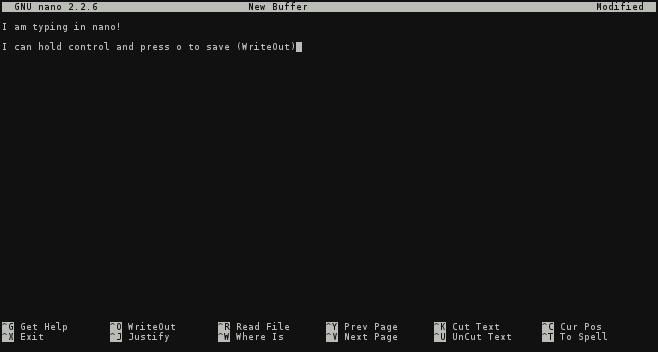
- User types like normal.
- Arrow keys used to to navigate the cursor.
- ^ + <key> Commands (control + key)
Version Control Systems
VCS is how one tracks changes, modifications, and updates to source files over time. Creating a history of changes for a project over time.
- Used for:
- Documentation
- Code
- Configuration
- Collaboration
- Other Names Include:
- Source Control Management (SCM)
- Version Control Software
- Revision Control Software
What VCS Solves

- Version control solves a lot of problems:
- I have changes I want to integrate (merge) into the main project.
- I want to track the state of this project over time.
- I want to make some changes without possibly breaking what I have.
- ... and much more.
Principles of VCS
Types of VCS
Git
Git is a Free and Open Source distributed version control system designed to handle everything from small to very large projects with speed and efficiency. ( https://git-scm.com )

Setting up Git
$ sudo yum install git
$ git config --global user.name "My Name"
$ git config --global user.email "myself@gmail.com"
$ git config --global core.editor "nano"
TODO: Use Git Locally
Create a project with Git:
$ mkdir my-project
$ cd my-project    # Always run `git init` inside of a project folder!
$ git init         # Never inside of your home directory.
Add and commit a file to your project with Git:
$ touch newfile.txt
$ git add newfile.txt
$ git commit  # Edit message in Nano, save the file, exit to commit.
To see which files are staged, unstaged, or untracked:
$ git status
To look through your repository history:
$ git log
To create and checkout a branch:
$ git branch    # Shows your branches and current branch
* master
$ git checkout -b <new-branch>  # Switches to new branch `<branch name>`
$ git branch
master
* new-branch
$ git checkout master   # Switches to existing branch `<branch name>`
TODO: Working With a Git Repository
- Checkout a new feature branch on your repository.
- Create/Edit files on the new branch.
- Create a diff between the two.
- Locally merge the changes from your new branch into Master.
What not to do with Git
Workflow(s)
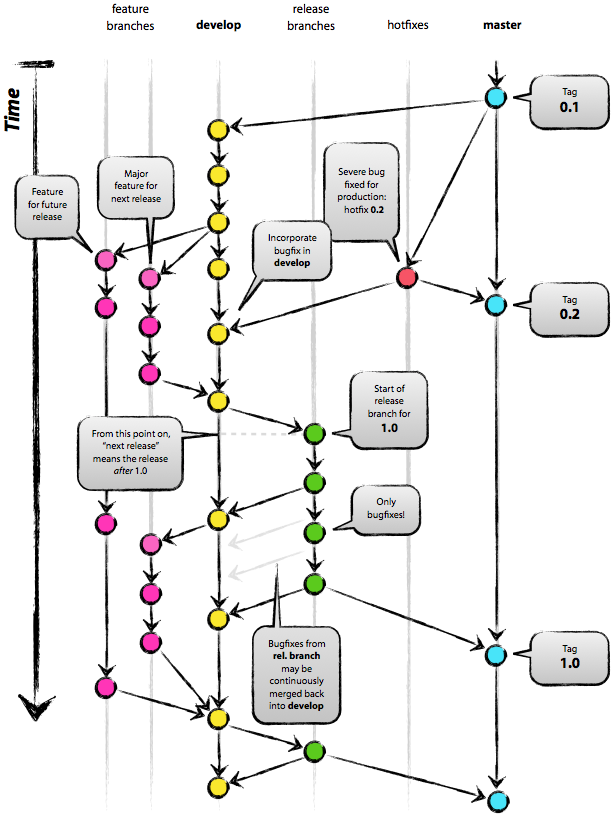
Everybody uses VCS differently. Choose the workflow that works best for everybody involved.
Centralizing Git
- Gitlab
- Open Source, free to run, feature rich.
- Github
- Very popular. Not Open Source but free for Open Source projects.
- Bitbucket
- Also popular, similar to Github, unlimited free private and public repositories.
- Gitolite
- Bare-bones. Fewer feature than the previous three. Open Source, useful for learning the nitty-gritty Git really works.
Cloning a Repository
$ cd /path/to/my/projects
$ git clone <some git url>
$ cd <new repo directory>
$ ls
TODO: Cloning Exercise
$ git clone https://github.com/DevOpsBootcamp/tinsy-flask-app.git
See http://git.io/vcVmB for more details about the tinsy-flask-app repository.
$ cd tiny-flask-app
$ virtualenv venv
$ pip install -r requirements.txt
$ python script.py
Now if you go to <your ip address>:<http port> in your web-browser to see a live version of the app!
Further Reading
- The Online Git Docs
- This is a portal to all of the official docs on git-scm.com. It includes everything from Getting Started to Git Internals. Check it out!
- Git workflow tutorial
- This is the tutorial provided on https://git-scm.com/about/distributed. It is a good high-level overview of some common git workflows.
- A successful Git branching model
- This blogpost describes a git workflow (git-flow) that the Open Source Lab bases their workflow on.