Lesson 14: Databases
| Homepage | Content | Slides | Video |
Warning
This lesson is under construction. Learn from it at your own risk. If you have any feedback, please fill out our General Feedback Survey.
Databases
Relating Data
Imagine a kitchen cupboard program that stores food currently in stock, where it is, recipes using it, expiration dates, etc.
Databases and Structure
- Structure
- SQL databases are based on around Relational Algebra
<Table 1>
+---------------+-----------+-----------+
| <Primary key> | <Field 1> | <Field 2> |
+---------------+-----------+-----------+
| 1             | value     | value`    |
| ...           | ...       | ...       |
+---------------+-----------+-----------+

<Table 2>
+---------------+-----------+--------------------------+
| <Primary key> | <Field 1> | <Foreign key to Table 1> |
+---------------+-----------+--------------------------+
| 1             | val       | 7                        |
| ...           | ...       | ...                      |
+---------------+-----------+--------------------------+
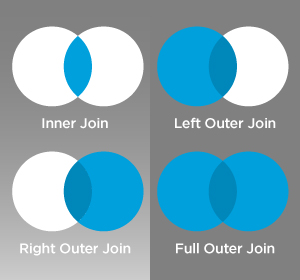
Concept: Relational Algebra
When to use a Database
When you have to work with a lot of well structured data.
- Databases are useful for two situations:
- Lots of data.
- High throughput.
Lots of Data
Concurrent Read/Writes
When not to use a Database
Types of Databases
There are two broad types of databases.
- SQL: Stores data in tables organized by column and field.
- NoSQL: Stores data differently than an SQL database.
- NewSQL: A middle-ground between SQL and NoSQL
SQL
- Examples:
- MySQL/MariaDB
- PostgreSQL
- SQLite
NoSQL
- Examples:
- MongoDB
- Apache Casandra
- Dynamo
- Redis
Database Concepts
Schemas
CREATE TABLE nobel (
    id int(11)
        NOT NULL
        AUTO_INCREMENT,
    yr int(11),
    subject varchar(15),
    winner varchar(50)
)
ENGINE = InnoDB;
Migrations
Raw SQL Syntax
TODO: Crafting Queries!
Craft a query to get the following data out of our Nobel table:
- Who won the prize for Medicine in 1952?
- How many people were awarded the 1903 Nobel in Physics?
- How many prizes were awarded to Linus Pauling?
- How many people have won more than once? (Difficult)
Don’t worry about getting it exactly right! Craft pseudo-SQL!
Answers
SELECT winner FROM nobel
WHERE yr=1952 AND subject='medicine'; #(Selman A. Wksman)

SELECT * FROM nobel
WHERE yr=1903 AND subject='physics'; #(3)

SELECT * FROM nobel
WHERE winner='Linus Pauling'; #(2)

SELECT COUNT(*) FROM nobel
AS n0 INNER JOIN nobel AS n1 on n0.winner=n1.winner
AND (n0.yr!=n1.1 or n0.subject!=n1.subject); #(16)
TODO: Using a Real Database
Installing MySQL
# Install mysql -- hit 'enter' to name your user root, and then enter
# again for password
$ sudo yum install mysql-server

$ sudo service mysqld start # Start the service

$ mysql_secure_installation # Use this to set the root password

# There is no current password
# Hit 'yes' or 'y' for all options
# Add a sensible password which you will remember
# DO NOT MAKE IT YOUR USUAL PASSWORD.

$ sudo service mysqld status # Make sure service is running

$ mysqladmin -u root -p ping # Ping the database

$ mysqladmin -u root -p create nobel # Create a table for Nobel prizes
Configuration
- Open and edit /etc/my.cnf.
- Add default_storage_engine = InnoDB to your file.
Users
Login to the mysql shell with your root user credentials:
$ sudo mysql -p
mysql> CREATE USER 'me'@'localhost'
       IDENTIFIED BY 'password';

mysql> GRANT ALL PRIVILEGES ON nobel.*
       TO 'me'@'localhost'
       WITH GRANT OPTION;

mysql> exit
Importing Data
# Get the database from the osl server
$ wget http://osl.io/nobel -O nobel.sql
# put the database in a file called nobel.sql
$ sudo mysql -p nobel < nobel.sql
# Open up mysql shell to execute queries
$ sudo mysql -p nobel
# List all the tables
SHOW TABLES;
# Print the layout of the database to the screen
DESCRIBE nobel;
Ways to Use a Database
Raw Queries
Native Queries
#!/usr/bin/python
import MySQLdb

db = ("localhost","testuser","test123","nobel" )

cursor = db.cursor()

cursor.execute("SELECT subject, yr, winner FROM nobel WHERE yr = 1960")

data = cursor.fetchall()

for winner in data:
    print "%s winner in %s: %s " % (winner[0], winner[1], winner[2])

db.close()
Object Relational Mappers
- Maps an Object in an application to a database table or relationship.
- Talks SQL to the database, your favorite language to you.
- Lets you point to different databases with the same syntax.
- Intelligently manages transactions to the database.
# SELECT * FROM nobel WHERE yr = 1960
for subject, yr, winner in session.query(Nobel).filter_by(yr=1960):
    print "%s winner in %s: %s " % (subject, yr, winner)
TODO: Use an ORM
Further Reading
- CS 340
- The CS 340 course at OSU (titled “Databases”) is a great introduction to this topic. If you have the option to take it you should!